
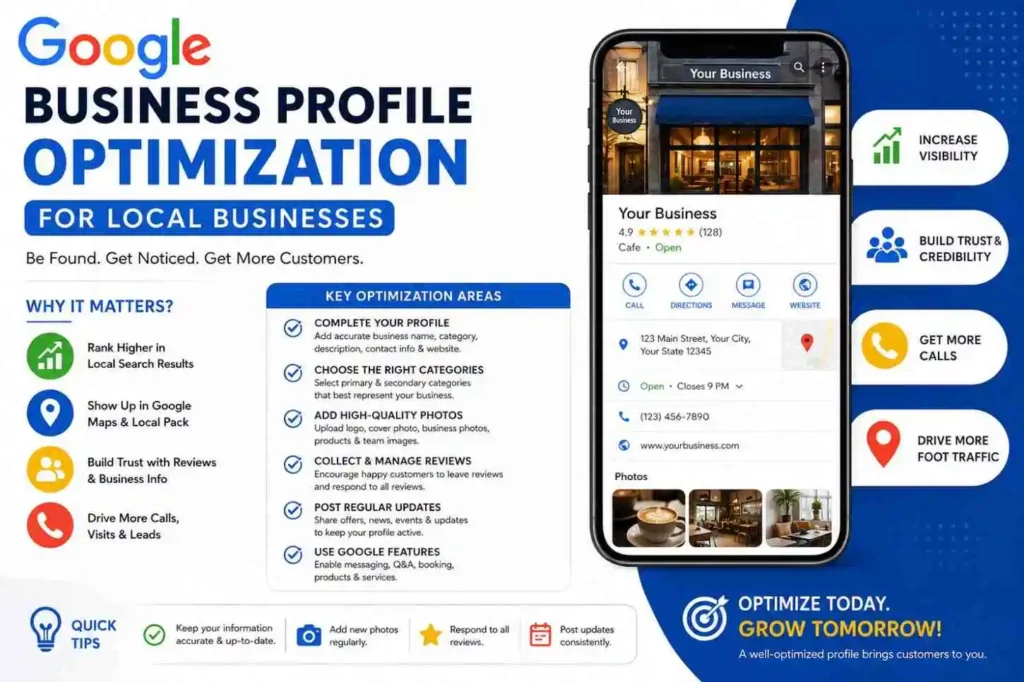
When people need to find something close by, the first thing that pops into mind is Google. People might be looking for a local restaurant, doctor, digital marketing services, local stores, and more. In all these cases, your business should appear where customers are searching for it.
This is when Google Business Profile Optimization for Local Businesses comes into play.
Google Business Profile helps you control the presentation of your business on Google Search and Google Maps. Your clients will be able to learn your company name, location, phone number, working hours, web page, offered services, photos, and other relevant information.
It is important to keep in mind that having a profile is not sufficient. An incomplete and out-of-date profile will not provide customers with enough information about your business. Optimization should focus on accuracy, relevance, customer experience, and credibility, not just on keywords.
In this guide, we will discuss practical approaches to optimizing your Google Business Profile.
What Is a Google Business Profile Optimization?
Google Business Profile optimization is a Google product that helps businesses create and manage their presence online on Google Search and Google Maps.
Depending on the type of business, the profile can contain information like:
- Business name
- Primary category
- Location or service area
- Contact number
- Website
- Hours of operation
- Services offered
- Products offered
- Images
- Customer reviews
- Business description
- Business updates
A Google profile for a business can act like a virtual storefront as well. A customer who visits a business website or contacts one might have checked out the Google profile of that business before that.
This makes it a crucial component of the local SEO process.
Why Google Business Profile Optimization Matters
Local searches usually carry a high level of purchasing or inquiry intention. The person searching for something locally might have decided to contact you already.
For instance, if someone is searching for “nearby SEO specialist” or “best bakery in Thrissur,” there’s a good chance that they are looking for a local business rather than general information.
Through Google business profile optimization, you can:
- Discover the business
- Find its location
- Contact the business
- Visit the website of the business
- Get directions to the business
- Learn about their offerings
- Read customer feedback about the business
- View pictures of the business
However, profile optimization doesn’t assure Google rankings. Local search visibility is determined by various aspects, which include relevance, distance, and prominence.
As such, the goal should be to deliver useful information rather than attempting to manipulate the results.
My Practical Experience With Google Business Profile
While engaging in the process of learning and practicing local SEO, there was an opportunity to establish and manage the Google Business Profile for my husband’s company.
From this real-life experience, I have learned that establishing a profile for my business does not entail merely putting down the name of the business and its phone number. It entails ensuring that the information provided represents the business and is useful to the visitors who would be looking for the products of the business.
During the process of developing the profile, there were things that one should be mindful about such as picking the right category, entering business information, listing the services offered, uploading photographs, and keeping the profile up-to-date.
This experience helped me learn about the practical ways through which a local business may make use of its presence on Google to offer useful information to people seeking its services.
1. Complete Your Google Business Profile Optimization Information
The first step towards google business profile optimization is the verification of the accuracy and completeness of the basic information.
Verify the following:
- Business name
- Business address
- Phone number
- Website
- Business hours
- Business service areas
- Business category
In case your business alters its business hours, phone number or any other key information, make sure to verify the updated profile information.
Inaccurate information may lead to bad experience on the part of the customer. For instance, in case Google shows that your business is operational while it isn’t, the customer may be disappointed.
2. Choose the Right Primary Category
The first business category will enable Google to know what kind of business you operate.
Select the category which best describes your business function.
Do not select the category which has nothing to do with your business just because you think it will assist you in ranking for a specific keyword.
If other categories are relevant to your business, then those can be considered too.
What matters is relevance.
Your category should be a description of your real business and not just keywords you wish to rank for.
3. Write a Natural Business Description
Business description must include information about what your business offers and helps prospective customers to know about your business.
This is not a platform where one should keep repeating the same keyword over and over again.
For instance, while writing the description for a Digital Marketing professional, it would not be difficult to include keywords like SEO, local SEO, Google Ads, social media marketing, content marketing, and WordPress.
The kind of descriptions to avoid are:
“Best SEO expert, SEO service, SEO specialist, best SEO company, SEO expert near me, SEO service in Thrissur…”
These are not natural descriptions but seem to focus too much on keyword repetition.
Describing your business in a simple and easy manner is always better.
The main keyword can be mentioned naturally in the course of writing.
4. Add Relevant Services
In the services section, you have the chance to give more details on the services that your business provides.
For instance, a digital marketer may put:
- SEO
- Local SEO
- Google Ads
- Social media marketing
- Content marketing
- WordPress development
The service must be related to the business.
Irrelevant services only for increasing the number of keywords will reduce credibility.
Service information will enable the customer to know if the business is capable of solving their problems.
5. Add High-Quality and Genuine Photos
Photos may serve to make your business profile more valuable.
Depending on your business, you may include:
- Logo
- Cover photo
- Pictures of the office/shop
- Pictures of the team
- Pictures of the products
- Pictures associated with services offered
- Samples of work done
Use photos that really reflect the actual business.
For instance, a restaurant can show photos of food, interior, exterior and the team. A retail shop can display pictures of products and shop premises.
It is advisable not to insert random pictures for the sole purpose of increasing the number of pictures.
Visuals should serve the aim of helping the customers better understand your business and feel comfortable communicating with it.
6. Encourage Genuine Customer Reviews
Reviews play an essential role in the decision-making process of several local consumers.
When choosing between companies, consumers can take into account the experience of former clients prior to contacting them.
In case you have pleased your clients, you can politely ask them to give a review.
Creating fake reviews is never a good idea to use.
Also, responding to reviews is helpful. Appreciate positive comments from clients and reply appropriately if some client raised a question.
Such response can show that the business values its clients.
7. Keep Your Profile Updated
Profiles of local businesses will vary with time.
You might consider adding additional services, changing your opening times, providing updated contact information, or adding additional products.
This means that profile management is not something one does only once.
Make sure to check the accuracy of the information and update where necessary.
In cases where this is possible, local businesses can also make use of profile posts to provide useful information such as:
- Additional services
- Events
- Announcements
- Offers
- Updates about the business
8. Maintain NAP Consistency
“NAP” is an acronym that stands for:
Name – Address – Phone Number
It is important that the key details about your business remain constant on all of your online presences such as your website, business directory, and various social profiles.
For instance, if there is inconsistency between the telephone number on your website and the telephone number on your business directory, this can lead to customer confusion.
Make sure you keep track of your online listings and update any out-of-date information.
9. Connect Your Google Profile With Your Website
The Google Business Profile must complement your website.
A Google Business Profile Optimization gives you an easy means of providing brief information about your company, while your website will offer extensive information.
For instance, a digital marketer may decide to create different web pages such as one that addresses search engine optimization, another one addressing local SEO, another one offering Google Ads, another page addressing social media marketing, and yet another one providing WordPress services.
Every page has a role to play and should offer useful information.
There is no need to create a number of pages that will give almost the same information.
Common Google Business Profile Optimization Mistakes to Avoid
There are many things that local companies may get wrong when creating and maintaining their profile.
These include:
- Inclusion of unnecessary keywords in the business name
- Choosing inappropriate categories
- Creating fake reviews
- Furnishing incorrect business details
- Not paying attention to customer reviews
- Uploading inappropriate photos
- Maintaining outdated business hours
- Creating duplicate business profiles
- Making unattainable promises about ranking
- Creating multiple pages with same contents
The ideal way to go would be to optimize the profile for the actual customers.
How Google Business Profile Supports Local SEO
A Google Business Profile is an integral part of a larger local SEO approach.
Your website, business listing, reviews, local listings, content, and customer experience can be used collectively to enhance your online visibility.
This means that if your website describes what you do, and your Google business listing has correct information about your business, customers will have several ways to learn about your business.
This way, local SEO is not about the optimization of a single component.
FAQs
1. Is Google Business Profile Optimization Free?
Yes. Google Business Profile is a service provided by Google for eligible businesses that helps them manage their presence on Google Search and Google Maps for free.
2. Does Every Business Need Google Business Profile Optimization?
Google Business Profile may be beneficial for businesses that have an eligible physical location or that operate in certain geographical locations. Whether you need to have a Google Business Profile depends on your business and the eligibility criteria set by Google.
3. Can Google Business Profile Optimization Help in Increasing Local Visibility?
If managed properly, a Google Business Profile can help your business share relevant information with people who search for it locally. Note, however, that having a Google Business Profile or managing it will not automatically grant your business any particular position in search results.
4. How Often Should You Update Your Google Business Profile Optimization?
Your Google Business Profile Optimization should be updated each time the information about your business changes. At the same time, reviewing your Google Business Profile periodically to make sure that your information is correct would be a good idea.
5. Are Reviews on Google Business Profile Optimization Important for Local Businesses?
Reviews can affect the perception that people might have about your
Final Thoughts
It would be a mistake to see Google Business Profile Optimization for Local Businesses through the prism of keyword stuffing or attempting any kind of manipulations with the ranking algorithm of Google. In fact, the optimization of Google Business Profiles is a way to provide potential clients with relevant and reliable information.
The perfect profile would inform people about what your company does, where it operates, how to contact it, the list of its services, and what other clients have to say about their experience there.
According to my experience of Google Business Profile creation for my husband’s business, I know for sure that some little nuances such as correct category choice, informative content, listing of services, and use of relevant photos may play their part.
You also need to ensure that your profile works together with your website and local SEO campaign. Consistency of your business information, lack of unnecessary keyword stuffing, website content creation, and the purpose of each website page should be taken into account.
Finally, but not less importantly, pay special attention to the Experience, Expertise, Authoritativeness, and Trustworthiness (EEAT) aspects of your online presence.
It is better to have genuine experience and reliable information rather